Published: 09/09/2025
We’re pleased to announce the latest improvements to your Member Dashboard, designed to make your payment process easier, and more transparent.
With these enhancements, you can now:
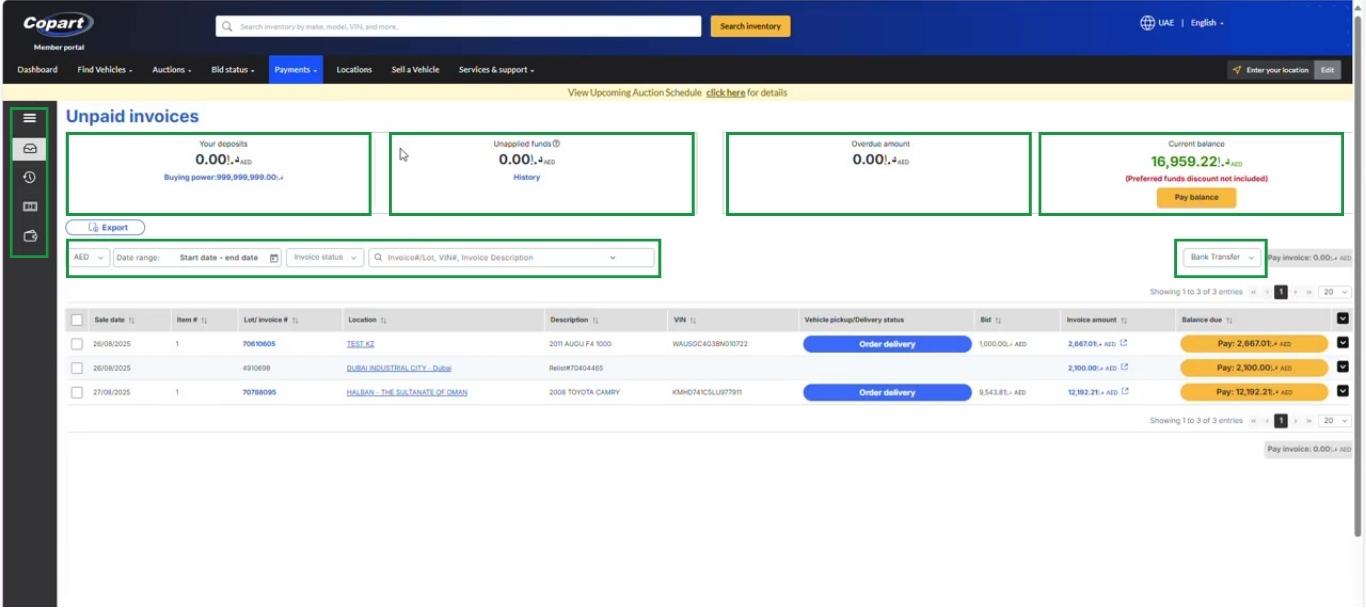
✅ View your current security deposit and unapplied funds.
✅ Track your overdue amount and payable balance.
✅ Switch between different currencies seamlessly.
✅ Filter lot invoices by date range, invoice status, or invoice description.
✅ See the Lot invoice details with the Preferred Payment discount rate, if you pay via Bank transfer.
These improvements provide a clearer view of your funds and ensure you always know the exact Lot payment amount, making transactions smoother and more convenient.
To explore these new features, simply log in to your Member Dashboard, go to the Payments tab, and select Payments Due.